
Last update:
Introducing the Sales Pipeline Review Solution

Account Executive + GTM
Your Pipeline Reviews Are Only as Good as Your Prep
Every sales team has a pipeline review. Most of them follow the same ritual: the rep pulls up the CRM, the manager asks "where are we on this deal?", and the next 45 minutes are spent reconstructing context that should have been obvious before anyone walked in the room.
The problem isn't the meeting. It's the prep — or the lack of it.
Your CRM tells you what's in the pipeline. It doesn't tell you why a deal has been stuck in the same stage for three weeks, whether the champion went quiet after the last call, whether engineering flagged a blocker in Slack, or whether the forecast number is real. That context lives scattered across call transcripts, email threads, Slack channels, and engineering backlogs — and nobody has time to pull it all together before a recurring meeting.
The Sales Pipeline Review Solution does that work for you.
What Is the Sales Pipeline Review Solution?
The Sales Pipeline Review Solution is Rhythms acting as your AI operating partner for pipeline reviews — a set of automated playbooks and document templates that install directly into Rhythms. Once set up, it:
Generates a deal-by-deal Pre-Read brief before every pipeline review — automatically, on schedule, delivered to your Slack or email
Maintains a live Dashboard that tracks pipeline health, open action items, pending decisions, and your deal watchlist — refreshed daily without any manual work
Reads across your CRM, transcripts, email, Slack, and engineering backlog — not just the data your reps updated
Lets you act directly from the document — ask Rhythms questions about any deal, update a CRM stage, send a Slack message to a rep, or draft a follow-up email without leaving the page. Internal actions execute on click; anything outbound is drafted for your review first.
It's not a report you run. It's a brief that shows up before you need it — and acts when you tell it to.
Sample: Your Meeting Prep, Done
Open the Dashboard the morning of your review and this is what you see — not a blank agenda, but exactly what needs to happen in the room. Rhythms has already read the pipeline, cross-referenced the watchlist, and surfaced the decisions that can't wait.
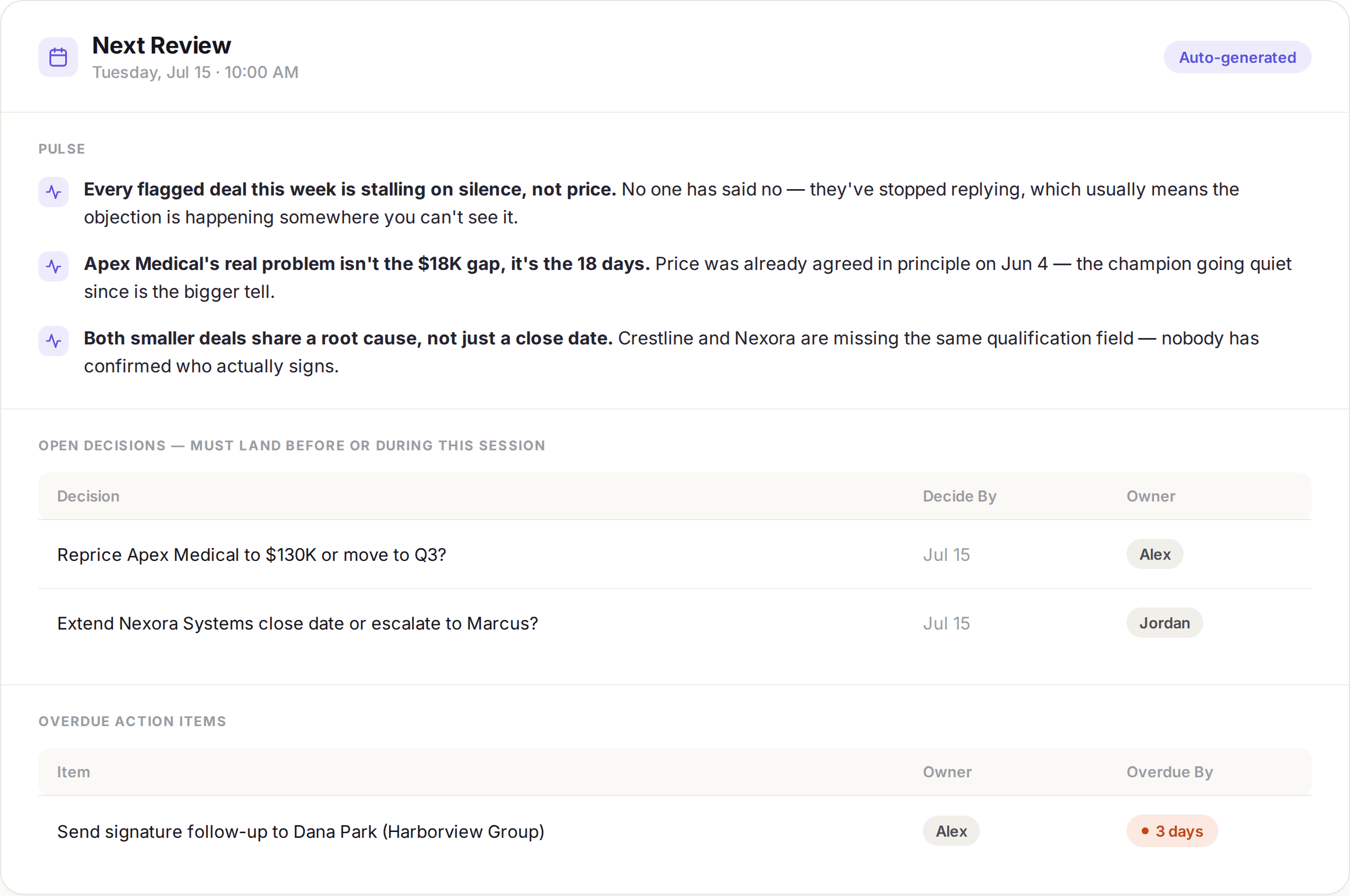
Sample data — your Dashboard populates automatically from your CRM, watchlist, and prior meeting data on every daily refresh.
Why You Need This
If you're asking yourself "what do I get from this that I don't already have?" — that's exactly the right question. Here's the honest answer.
Your CRM is a record system, not a decision-making tool
CRMs are great at storing deal data. They're not designed to surface why a deal is at risk, who went quiet, or what changed since the last review. That requires reading between the lines — across tools, across conversations, across teams.
The Sales Pipeline Review Solution connects your CRM to the signals that actually explain deal health:
Signal | What it reveals |
|---|---|
Call transcripts (Granola, Zoom) | Objections raised, sentiment shifts, champion engagement |
Email threads (Gmail) | Response cadence, stakeholder involvement, pricing pushback |
Slack conversations | Internal blockers, cross-functional concerns, deal urgency |
Engineering backlog (Linear, Jira) | Technical blockers that could delay delivery or close |
Calendar | Meeting cadence, upcoming touchpoints, ghosting patterns |
None of this is in your CRM. All of it matters.
Your forecast is only as honest as the rep who updated it
Every rep has a natural bias toward their own deals. It's not dishonesty — it's human nature. Reps interpret ambiguous signals optimistically, update CRM stages based on gut feel, and sometimes leave deal records stale for weeks between reviews.
The result: your forecast is built on a patchwork of subjective interpretations, not objective signals. A deal marked "Verbal Commit" might have a champion who hasn't responded to email in two weeks. A deal in "Negotiation" might have an open engineering blocker nobody flagged.
The Sales Pipeline Review Solution doesn't ask the rep to self-report. It reads the actual signals — call transcripts, email cadence, Slack threads, calendar activity — and surfaces what's really happening in each deal, independent of how it's staged in the CRM.
Sample: What a Deal Spotlight Looks Like
The Pre-Read surfaces a deal spotlight card for every flagged deal — pulling signals from across your stack so you can see what's actually happening, not just what the CRM says. Deals are sorted by risk level (Critical 🔴 first, then Watch 🟡), then by deal size. Each card ends with action buttons you can click to execute next steps directly — no tab-switching required.
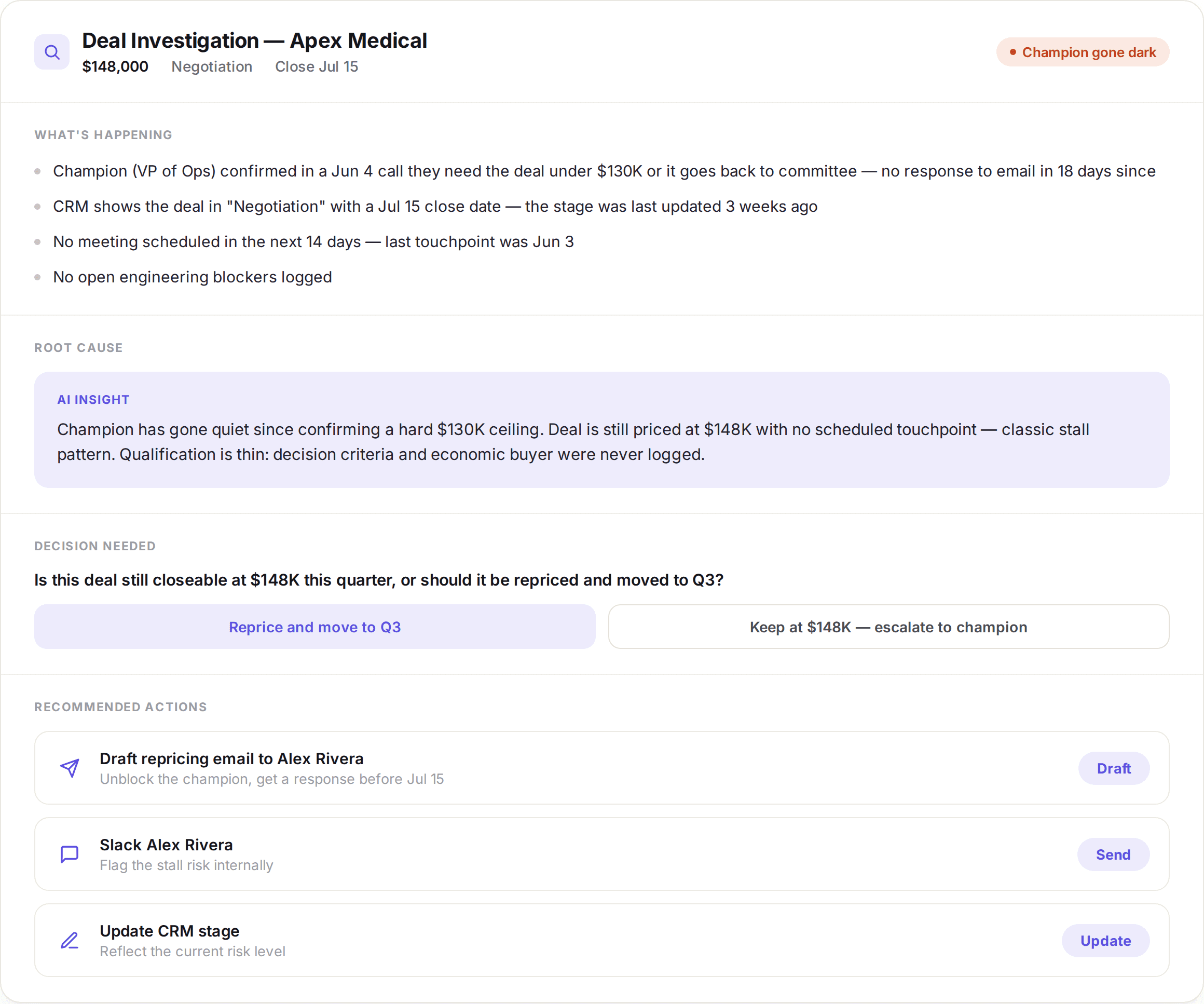
The buttons above are live — click one and Rhythms executes the action: drafts the email, sends the Slack message, or updates the CRM record. You can also ask Rhythms anything about the deal directly in chat: "What did the champion say on the last call?" or "Has engineering committed to the feature they need?"
What You Get
Installing the Sales Pipeline Review Solution gives you everything needed to keep your team informed before every review, focused on the right deals during it, and accountable to what was decided after it:
Two playbooks:
Pre-Read — Runs automatically before each pipeline review meeting, generating a deal-by-deal brief and delivering it to your configured channel or DM
Dashboard Refresh — Runs daily, keeping your pipeline KPIs, action items, decisions, and deal watchlist current
Two document templates:
Sales Pipeline Review — Dashboard — A persistent hub for pipeline health across every review. Tracks forecast health (5 KPIs), a Pulse of current pipeline signals, a Last Review Snapshot, your Next Review prep, Pipeline KPIs trend chart, open action items, pending decisions, your deal watchlist, a full On Track table, and a History log of past reviews, resolved decisions, and closed items. Optionally includes a Rep Scoreboard for teams managing multiple reps.
Sales Pipeline Review — Pre-Read — A deal-by-deal brief generated fresh before each meeting. Includes: Forecast vs Quota (4 KPIs + what changed), Follow-through (open action items from the last meeting with ✅/🔄/⚠️ status), Deal Spotlight Cards for every flagged deal (Critical 🔴 and Watch 🟡), an On Track summary, and Pipeline Movement (what advanced, what's new, what slipped)
Notifications: After each Dashboard Refresh, a summary notification is sent to your configured Slack channel, DM, or email — with the pipeline Verdict (On Track / At Risk / Behind), key observations, and links to the Dashboard and Pre-Read. You can choose to receive notifications after every refresh, or only when the Verdict is At Risk or Behind.
Sample: Follow-Through That Actually Sticks
Every Pre-Read opens with a Follow-through card — a live status check on every commitment made in the last meeting, cross-referenced against your CRM and transcripts. No more “I thought you were handling that.” Stuck items have action buttons so you can unblock them before anyone walks in the room.
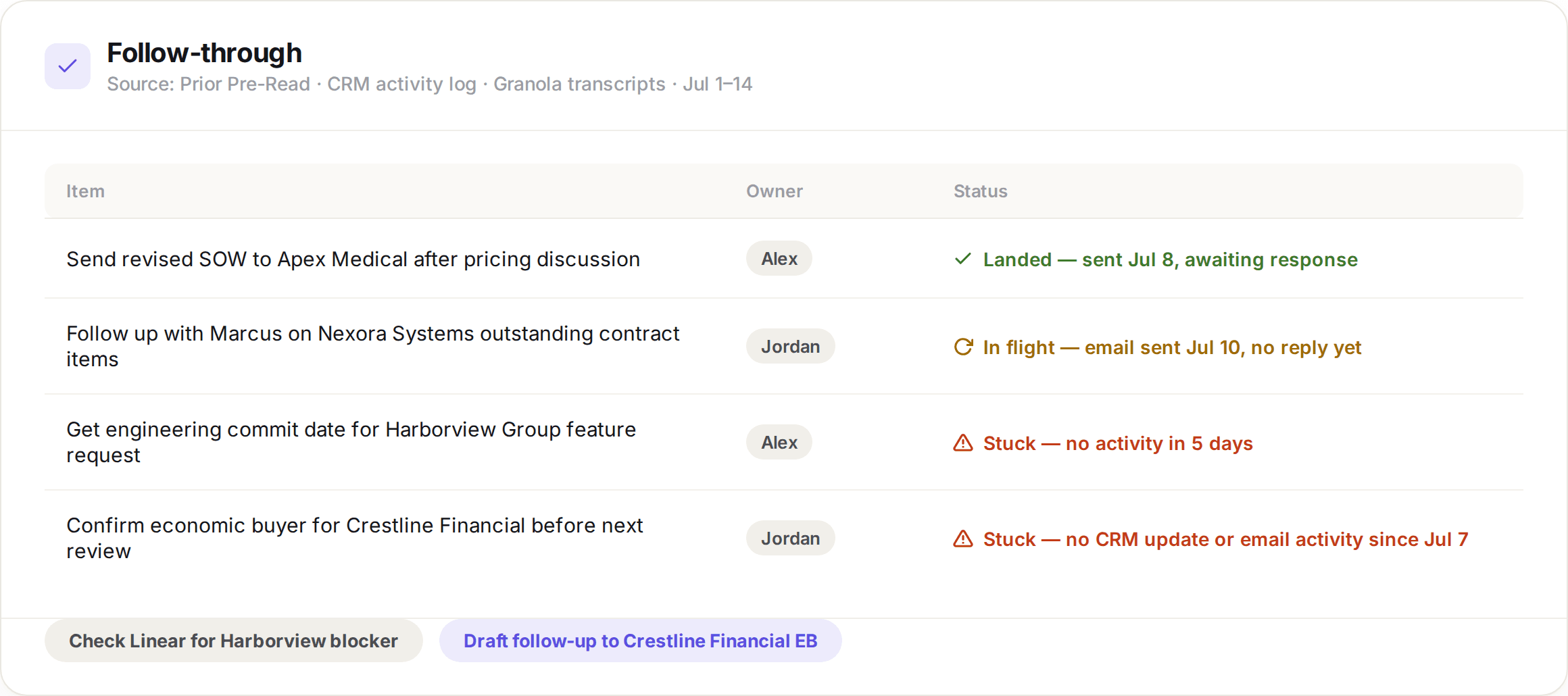
Sample data — your Pre-Read generates this automatically before each pipeline review, pulling from your CRM activity log, prior brief, and meeting transcripts.
How to Set It Up
Setup takes about 10 minutes. Here’s what to expect.
Step 1: Connect your sources
Before running Setup, make sure your key integrations are connected in Rhythms (Settings → Integrations).
Required:
A CRM — HubSpot, Salesforce, Attio, or another connected CRM. This is the authoritative source for deal data.
Strongly recommended (enrichment sources):
Granola or Zoom — for call transcripts
Gmail — for email thread context
Slack or Teams — for internal signals and cross-functional conversations
Google Calendar or Outlook Calendar — for meeting detection and scheduling
Linear or Jira — for engineering backlog and blocker visibility
You don’t need all of these to get started. The solution works with just a CRM, and each additional source makes the Pre-Read richer. Connect what you have and add more later.
Step 2: Install the solution
In Rhythms, navigate to the Solutions marketplace and find Sales Pipeline Review. Click Install.
Rhythms will walk you through the Setup, which will:
Find your recurring pipeline review meeting (automatically from your calendar, or manually if you haven’t connected one)
Confirm which CRM and enrichment sources to use
Ask for your fiscal year start month — this is used to calculate quarter labels and “weeks remaining” correctly. If your fiscal year starts in February, the solution will label and scope quarters accordingly
Ask how you want the Pre-Read delivered (Slack DM, Slack channel, email, or just the document)
Ask where to send Dashboard notifications after each refresh, and whether to send them after every refresh or only when the Verdict is At Risk or Behind
Create your Dashboard and Pre-Read documents
Trigger an initial Dashboard Refresh so you see live data right away
Step 3: Preview your first Pre-Read and Dashboard
Once setup is complete, you can generate your Dashboard and a preview Pre-Read immediately using your current pipeline data. This lets you see exactly what the brief will look like before the first scheduled run.
Setup will offer this at the end — take it. It’s the fastest way to validate that your sources are connected correctly and the output looks right.
Getting the Most Out of It
The documents are interactive — don't just read them, use them. Every deal card in the Pre-Read has action buttons for the recommended next steps. Click one and Rhythms executes it: sends a Slack message to the rep, updates the CRM stage, or logs a note. Outbound actions — emails to prospects or customers — are drafted for your review, not sent automatically. You can also ask Rhythms questions directly from the document — "What did the champion say on the last call?", "Has this deal slipped before?", "What's the engineering status on the feature they need?" — and get answers grounded in your actual data.
Connect more enrichment sources. The Pre-Read gets meaningfully better with each additional source. A CRM-only brief tells you deal stage and amount. Add Granola transcripts and you get sentiment and objections. Add Gmail and you get response cadence. Add Slack and you get internal context the CRM will never have. Add Linear and you get engineering blockers before they become surprises in the room.
Use the Dashboard between reviews. Because it refreshes daily, it's a reliable place to check pipeline health any time — not just when the meeting is on the calendar. Share it with your team as the standing source of truth for pipeline status.
Configure notifications to match your workflow. You can choose to receive Dashboard notifications after every refresh, or only when the Verdict is At Risk or Behind. If you're managing a large pipeline and don't want daily noise, the conditional option keeps you informed without overwhelming your Slack.
Review action items after every session. The Dashboard tracks open action items across every pipeline review. Make it a habit to check the action item section after each meeting — it's the fastest way to ensure follow-through and catch anything that slipped.
The Bottom Line
Pipeline reviews are one of the highest-leverage recurring meetings in any sales organization. They're where deals get unstuck, forecasts get calibrated, and cross-functional blockers get surfaced.
But they only work if the team walks in prepared — and if the insights from each session actually carry forward.
The Sales Pipeline Review Solution handles the work about work — the prep, the context-gathering, the follow-through tracking — so your team walks in ready to make decisions, not reconstruct history. It doesn't replace your judgment. It gives you the context to use it.
Ready to get started? Install the Sales Pipeline Review Solution from the Rhythms marketplace and run Setup — you'll have your first Pre-Read before your next review.
Share this post: