Last update:
Introducing Documents

Today we're shipping Documents — a new way to build business reviews, QBRs, team syncs, and operational reports inside Rhythms.
Every operations leader we've talked to describes the same workflow. Open the CRM, pull revenue numbers. Switch to the project tracker, screenshot the velocity chart. Export the pipeline from your sales tool. Copy NPS from support. Paste it all into a doc. Format it. Repeat next week.
The data exists. It's just trapped in ten different tools, and assembling it is the job nobody signed up for.
How it works
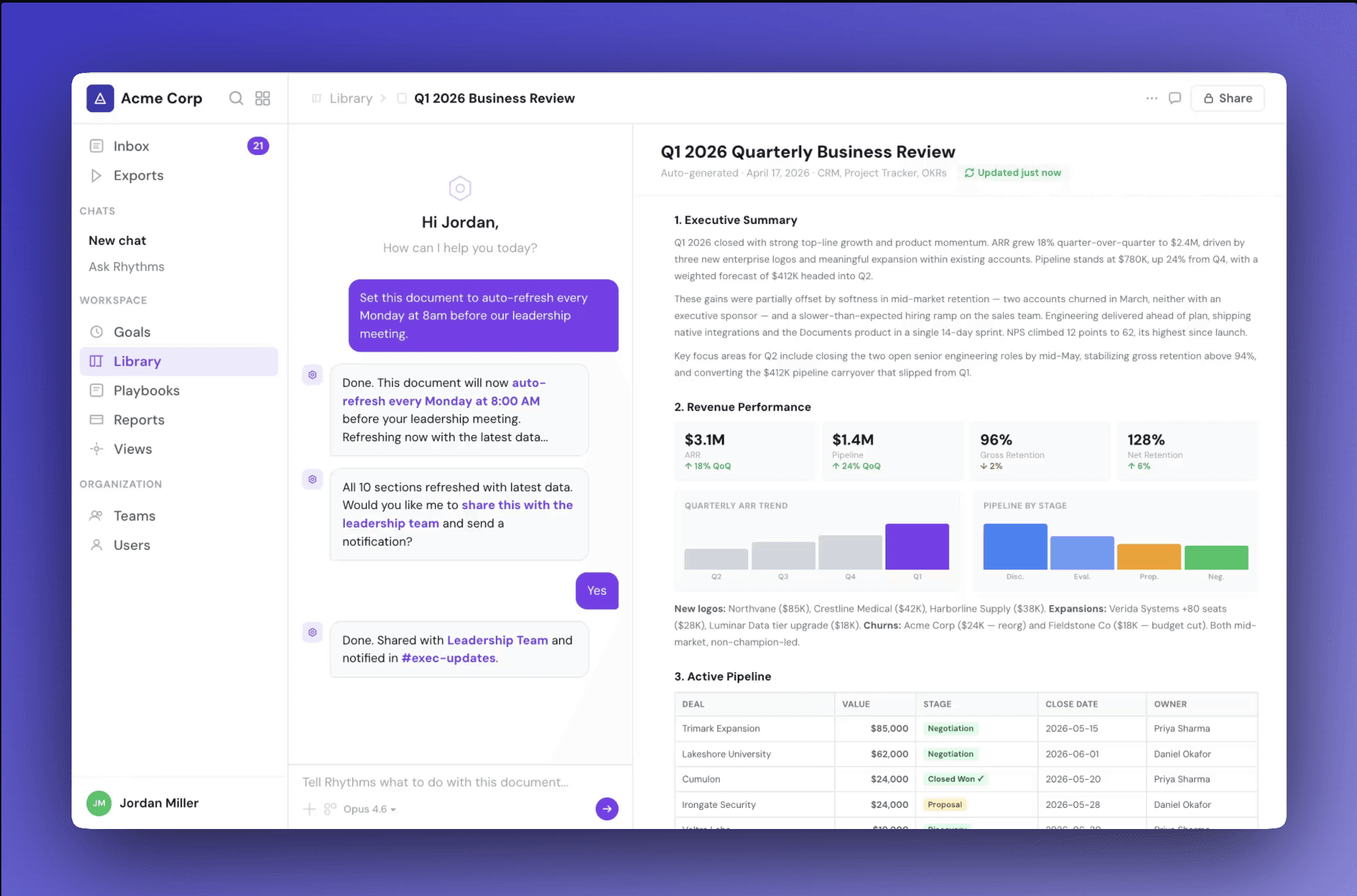
Tell Rhythms what you need in plain language. The agent connects to your tools, pulls the relevant data, and builds a complete document — with charts, tables, metrics, and analysis.
A single prompt like "Build me a Q1 Business Review" produces a ten-section document covering revenue performance, pipeline, OKR progress, engineering velocity, customer health, risks, key wins, headcount, and priorities. Each section cites its data source — Salesforce for revenue, HubSpot for pipeline, Linear for engineering metrics, Pylon for support health — so you know exactly where every number came from.
The document isn't a wall of text. It's structured the way your team actually reads it: metric cards with change indicators, color-coded pipeline tables, progress bars by department, severity-tagged risk flags, and stacked bar charts for headcount. Dense, scannable, ready to present.
Auto-refresh
The most tedious part of operational reporting isn't building the first version. It's keeping it current.
Documents can be set to auto-refresh on any schedule. Every Monday at 8am before your leadership sync. The first of every month before your board meeting. The document pulls fresh data from your connected tools, updates every section, and is ready before your meeting starts.
No more Sunday night prep. No more "let me pull the latest numbers" in a meeting. The document stays alive.
Templates and Library
Documents live in a Library where your team can browse, search, and organize them. We've built templates for the reports teams run most often:
Quarterly Business Review — revenue, pipeline, OKRs, customer health, risks, priorities
Weekly Team Sync — kudos, key metrics, sales updates, pipeline, engineering velocity, action items
Customer Health Profile — account overview, usage, NPS, support tickets, renewal risk
Engineering Retro — velocity, incidents, shipped features, blockers, next sprint
Start from a template or describe something new. The agent builds it from scratch using whatever tools you've connected.
Collaboration
Documents are built for teams. Share with specific people or groups, set view or edit permissions, and collaborate in real-time. An AI chat panel sits alongside every document — ask it to update a section, add a chart, or change the analysis. Your edits and the agent's work live in the same place.
When a document is ready, share it with one click. Rhythms notifies your team in Slack or email.
Export
Documents can be exported to PowerPoint with a single click. Choose from saved templates — executive dark, team meeting, QBR — and Rhythms generates a formatted slide deck from your document content. Charts, tables, metrics, and analysis all carry over. Download the .pptx and present directly.
Connected tools
Documents pull live data from 20+ integrations your team already uses. Connect once, and every document has access.
CRM — HubSpot, Salesforce, Pylon
Project Management — Asana, Atlassian (Jira & Confluence), Azure DevOps, GitHub, Linear, Monday.com, Planner
Scheduling — Google Calendar, Outlook Calendar
Communication & Meetings — Gmail, Granola
Spreadsheets & Analytics — Excel, Google Sheets, PowerBI, Smartsheet, Tableau Cloud
Knowledge & Data — Notion, Neon
Connect a tool once, and every document has access to its data. No CSV exports, no manual entry, no copy-paste.
Availability
Documents is available today for all Rhythms users. Templates, auto-refresh, and the full Library are included on all plans.
Try Documents →
Share this post: